
6 Types of Transactional Emails Every Marketer Should Know
HubSpot Transactional Email API
Current State
Problem
- High number of inquiries to your service team requesting order updates, receipts, or other transactional information
- Your update emails aren't being received by your customers because they are going to spam or junk folders
- Your can't audit all the emails your customers are getting in any timely manner
- You can't control the sending email, reply to email, or branding of your transactional emails
Impact
- High number of inquiries per 100 orders
- Customer stress and frustration
Technical Cause
- Disconnected systems
- No custom transactional email features
Future State
- Employees should be able to see every communication with a customer in HubSpot
- Transactional emails should be consistent in look
- Transactional emails should all come from the same email address, or domain
- Customer inquiries should drop
- Custom satisfaction should increase
Architecture Patterns
Transactional email is an add on feature of HubSpot. Transactional email is sent through a dedicated email server just for transactional email. Sending transactional email is triggered by an http request to the HubSpot API. These http requests bust be in formatted JSON matching the expected variables of the email template.
The following diagrams show the three main ways to trigger transactional email sending in HubSpot. We can provide deeper technical discussions, and ideation sessions with your team by request.
Middleware
We will always use our low code/no code provider tray.io to manage these integrations. Tray.io provides a high level of reliability, data security, and error handling we need to have in order to guarantee a high level of service to our clients.
If you would like to manage these through your in-house IT department, there are a couple of changes to be aware of,
- All the diagrams below can be adjusted to remove Tray.io and be replaced with your own server, or integration service
- Denamico can still provide consulting to help you create the proper data map, and data flow requirements
Trigger Directly From Your Application
In this application, there is no middleware handling the integration.
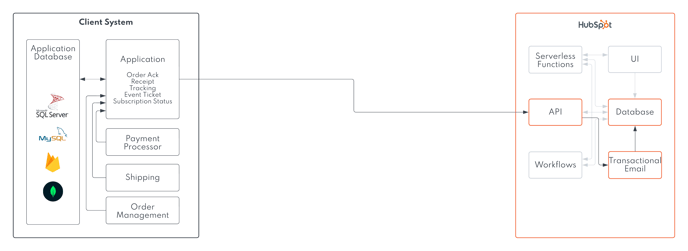
Trigger http based on your business logic criteria.
Data must be formatted JSON to meet the requirements of each transactional email.
Trigger Our Middleware From Your Application
Similar to the architecture shown above. The middleware removes part of the requirements needed from your application.
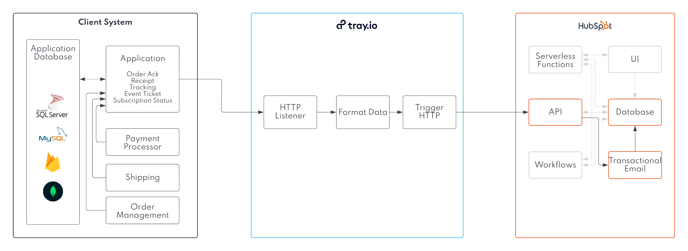
Choose one of the following trigger methods
- Your system sends us an http request for only the events you want us to send on
- Your system sends us many http requests, but you provide us criteria to filter which events we should send transactional emails on
Choose one of these HTTP routing methods
- We can provide a different route for each transactional email template
- We can get the desired transactional email template from a variable in your data
Data format
- You can provide data in any of these formats. JSON, XML
- We accept encrypted formats and can decrypt in our middleware
Trigger Middleware From Multiple of Your Applications
This is a slightly different version of the architecture shown above. This version would be ideal for companies that experience these two things,
- Your custom application is not integrated real time with other sub systems. Data is imported in batches, or processed in less frequent time intervals
- Your sub systems (payment processor, shipping system, etc) can send http notifications when actions take place
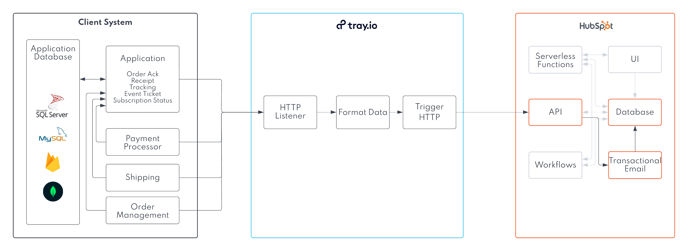
The scenario will be triggered to run as soon as an http signal is received by our middleware.
We will provide a unique route for each system to post to. Each route will be assigned to a type of transactional email.
Data format
- You can provide data in any of these formats. JSON, XML
- We accept encrypted formats and can decrypt in our middleware
Trigger Via Your Messaging System
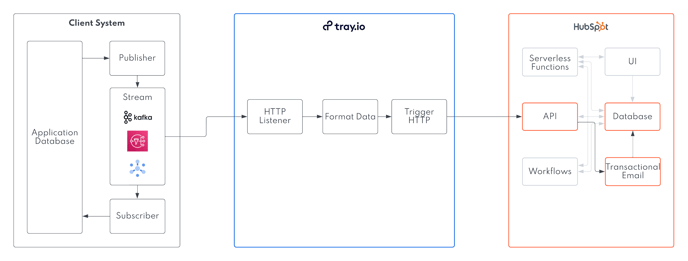
Subscription messages that are sent to our middleware should only include those that should trigger the transactional emails to send.
Choose one of these HTTP routing methods
- We can provide a different route for each transactional email template
- We can get the desired transactional email template from a variable in your data
Data format
- You can provide data in any of these formats. JSON, XML
- We accept encrypted formats and can decrypt in our middleware
Error handling
We design an error handling process for issues that would occur in your integration.
| Error | Actions |
| Unexpected System Outage In HubSpot | |
| Unexpected System Outage In Your Custom Application | |
| Incorrect Data Types Between Systems | |
| Missing Records | |
| Any errors not included in here |