![Primary_Denamico_Logo_Horiz_White.png]](https://support.denamico.com/hs-fs/hubfs/Logo/Primary_Denamico_Logo_Horiz_White.png?height=50&name=Primary_Denamico_Logo_Horiz_White.png)
Although HubSpot does not natively provide the functionality to sync data to a custom application, this functionality can be achieved through use of integration software, or custom integration micro-services. The solutions below are not full technical documentation, but provide an overview of functionality required to begin deeper exploration.
Current State
Business Problem
- Employees are spending lots of time looking in two separate computer systems to find the information they need
- Marketing is importing lists of contacts, or contact updates from another system
- Marketing is can not see which contacts are customers
- Marketing can't create engaging user journeys due to missing information
- Reporting data is inaccurate between systems. There seems to be no source of truth
Business Impact
- Low overall employee effectiveness
- Low ability to respond quickly, and accurately to opportunities
Technical Cause
- Non integrated systems
- Non-stable or reliable integrations
- A custom-built application that may not have an API
Future State
Your users should have the experience of,
- HubSpot users having real-time, or near real-time updates of information from your custom application
- No need for duplicate data entry
- Ability to use HubSpots automation tools to create user journeys based on data updates from your custom-built application
Architecture Patterns
The following diagrams show the three main ways to sync data back and forth between HubSpot, and your custom-built application. We can provide deeper technical discussions, and ideation sessions with your team by request.
Middleware
We will always use our low code/no code provider tray.io to manage these integrations. Tray.io provides a high level of reliability, data security, and error handling we need to have in order to guarantee a high level of service to our clients.
If you would like to manage these through your in-house IT department, there are a couple of changes to be aware of,
- All the diagrams below can be adjusted to remove Tray.io and be replaced with your own server, or integration service
- Denamico can still provide consulting to help you create the proper data map, and data flow requirements
Sync Triggers
| Hubspot Sync Triggers |
Private App* Immediate HTTP |
Workflow* Immediate HTTP |
Polling 5 Minute Interval Min |
| Record Created | ✓ | ✓ | ✓ |
| All Record Updates | ✓ | ✓ | ✓ |
| Updates on Specific Properties | ✓ | ✓ | 𝗫 |
* Private app and Workflow integrations require a subscription to at least one enterprise hub
Integrating through your API
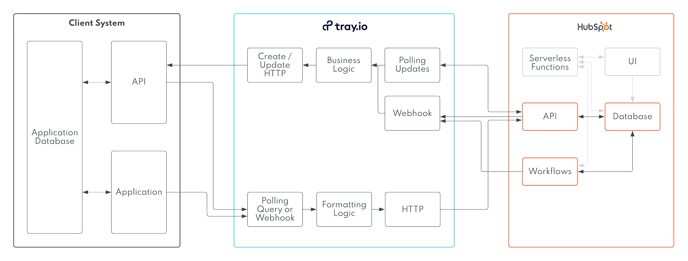
Custom application trigger options
- Polling api query from tray.io
- http notification from your server
Integrating directly to your database

Custom application trigger options
- Polling database query from tray.io
Your database must be able to be connected using one of these standard connection methods from tray.io
- JDBC (MySQL, PostgreSQL, Oracle, Snowflake, SQL server)
- MySQL
- Microsoft SQL Database
- Mongo DB
- Firebase
Integrating to your messenger/event service
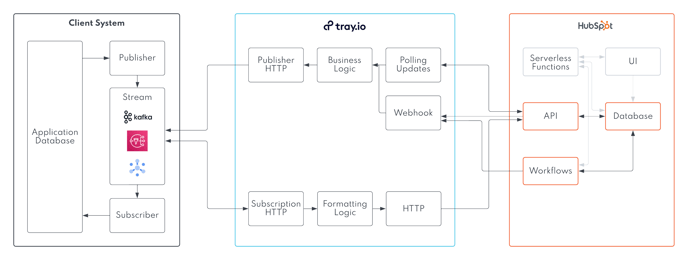
Custom application trigger options
- polling query to your messaging system
- http notification from your messaging system
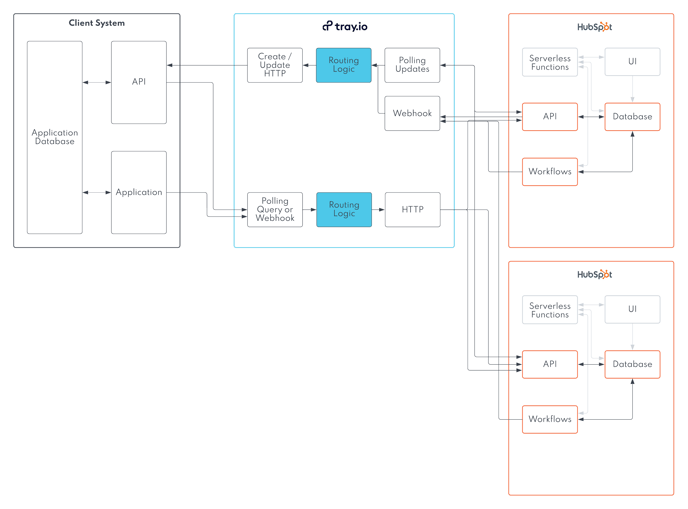
Integrating to Multiple Hubspot Portals
Businesses such as franchises may be integrating to multiple HubSpot portals using a single source system application. If this describes your business, we will create portal routing criteria with you as part of our Data Mapping process.
These portal routing criteria will be added to your middleware functionality, as highlighted in the blue boxes below.
Data Mapping
Data Mapping will be completed in our design phase. This will include the following outcomes,
- An ERD of your custom system with properties, and data types
- An ERD of your HubSpot portal with properties, and data types
- A data mapping table matching records, properties, and data type conversions between your custom application and HubSpot
- Any mapping decisions matching your custom database tables to HubSpot properties (drop-downs, multi-selects)
- A user mapping table
- Portal mapping criteria (if required)
- Physical address mapping criteria (if required)
Error handling
We design an error handling process for issues that would occur in your integration.
| Error | Actions |
| Unexpected System Outage In HubSpot | |
| Unexpected System Outage In Your Custom Application | |
| Incorrect Data Types Between Systems | |
| Missing Records | |
| Any errors not included in here |