![Primary_Denamico_Logo_Horiz_White.png]](https://support.denamico.com/hs-fs/hubfs/Logo/Primary_Denamico_Logo_Horiz_White.png?height=50&name=Primary_Denamico_Logo_Horiz_White.png)
You may run into scenarios where you want to trigger something to happen in your back end system based on input from HubSpot. Some use cases might be,
- Your support rep wants to trigger automation to create a return label for products without switching systems
- Your sales rep wants to resend a payment receipt held in another system without switching systems
Current State
Business Problem
- Employees are spending lots of time looking in two separate computer systems to find the information they need
- You have to train employees on how to work in multiple systems in a specific way
Business Impact
- Low overall employee effectiveness
- Low ability to respond quickly, and accurately to opportunities
Technical Cause
- Teams have specialized systems with specific features that are critical to each team
- There is an intentional barrier between systems due to data structures, or processing requirements
Future State
Your users should have the experience of,
- HubSpot users quickly do repeatable tasks without changing systems
Trigger Options
In HubSpot, there are a few ways you can generate trigger based actions.
Automatic Triggers
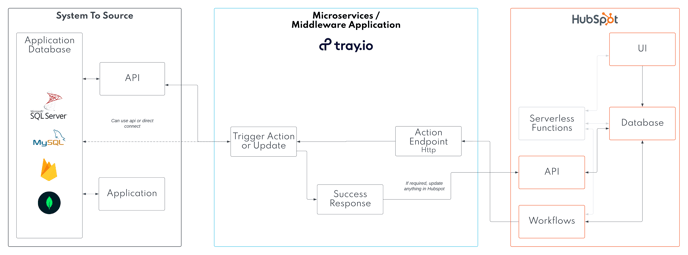
- HubSpot workflows: these trigger on a specific property changing. On Enterprise plans they can send http requests to another service
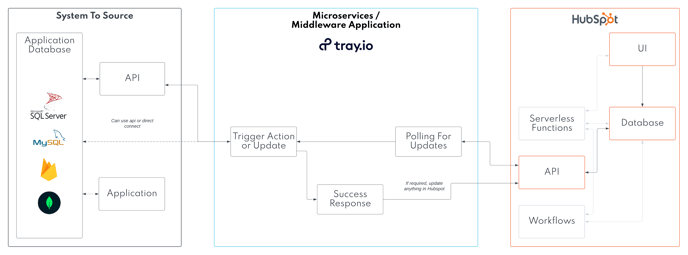
- Tray.io Polling for updates: Using tray.io we can poll for specific updates that should trigger actions
Manual Triggers
- Custom Sidebar Card Actions: Using HubSpot Custom Sidebar Cards you are able to define custom button created actions that can occur. You can read our documentation on this here
- Custom Center Card Actions: Using HubSpot UI Extensions, you can create custom buttons that can load buttons based on logic created inside HubSpot serverless functions.
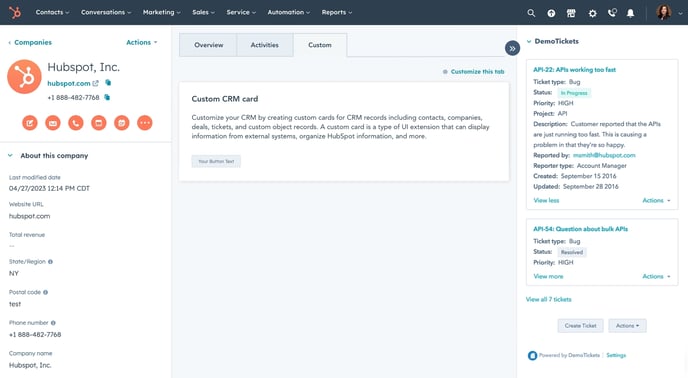
This image shows both a center card button, and what custom sidebar action buttons look like.
Architecture Patterns
The following diagrams show examples of system architecture to view outside data in custom cards in HubSpot. We can provide deeper technical discussions, and ideation sessions with your team by request.
Using Sidebar Cards To Trigger Actions
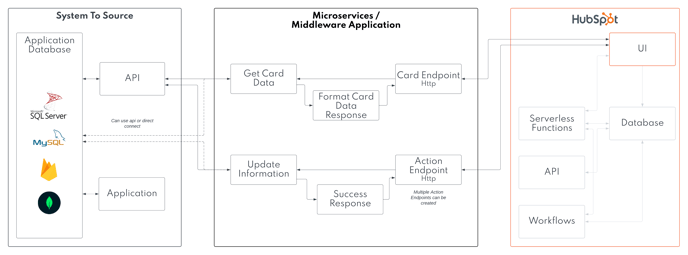
Using Center Cards With Middleware To Trigger Actions
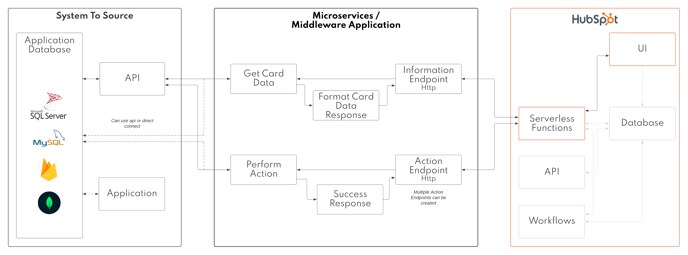
Using Center Cards Without Middleware To Trigger Actions
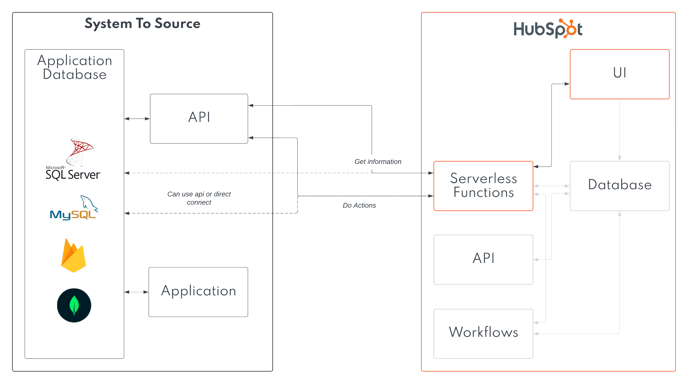
Using Workflows to Trigger Actions
Using Polling To Trigger Actions
Data Mapping
You will need to determine a key that exists in both systems. Examples might be
Contacts
- HubSpot Contact ID
- Other system Contact ID
- email address
Companies
- HubSpot Company ID
- Other system Company ID
- Domain name
- EIN
Error Handling
Based on your integration architecture above, we may add a couple error handling scenarios to plan for.
| Error | Actions |
| Middleware / Micro service Outage |
HubSpot records continue to load. Error message displayed on cards. |
| Data format issue between systems |
HubSpot records continue to load. Error message displayed on cards. |
| No data available to be shown in cards |
HubSpot records continue to load. No cards are loaded |