![Primary_Denamico_Logo_Horiz_White.png]](https://support.denamico.com/hs-fs/hubfs/Logo/Primary_Denamico_Logo_Horiz_White.png?height=50&name=Primary_Denamico_Logo_Horiz_White.png)
Combining HubSpot with a robust back end system allows you to create engaging user experiences around your unique business information. Some example use cases,
Your business has an application you host on the app store. When someone installs your app and creates an account, you would like to run a couple user journeys such as,
- Verify your email
- Lead nurturing campaign to promote upgrading to a premium version of the app
Architecture Patterns
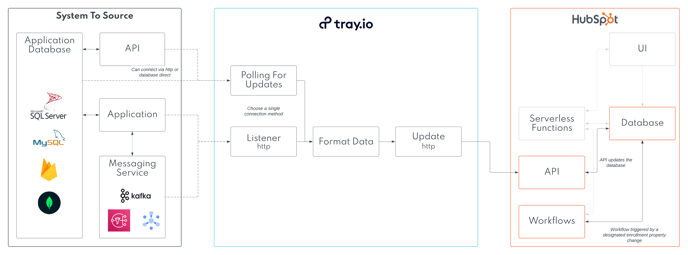
The following diagrams show examples of system architecture to view outside data in custom cards in HubSpot. We can provide deeper technical discussions, and ideation sessions with your team by request.
Middleware Triggers
You can trigger our middleware in a couple main ways
- We can poll for updates on an api you have published on your custom built application
- We can poll you database for updates given the query criteria specified
- We can listen for an http call from your application or a messaging service you use. Some examples of triggers might be,
- A user clicks a button you have created in your custom application which sends an http to our system
- Adding or updating a record automatically creates a messaging trigger
Property Recommendations For Triggering Updates
HubSpot has robust workflow enrollment triggers which may simplify the integration requirements between the two systems. Most workflows can be triggered by a combination of any of these events
Date properties
- Trigger when a date property is a specific date
- Trigger when a date property is today
- Trigger when a date property is after a date
- Trigger when a date property is before a date
- Trigger when a date property has been updated in the last x number of days
User Selection Properties
- Trigger when a user selection property is equal to a specific users
- Trigger when a user selection property has been updated in the last x number of days
Text Property
- Trigger when a text property is an exact value
- Trigger when a text property contains a value
- Trigger when a text property has been updated in the last x number of days
Boolean Property
- Trigger when a boolean property is an exact value
- Trigger when a boolean property has been updated in the last x number of days
Since you have so many options of updates, you may not need to sync is as many record values as originally thought.
Data Mapping
You will need to determine a key that exists in both systems. Examples might be
Contacts
- HubSpot Contact ID
- Other system Contact ID
- email address
Companies
- HubSpot Company ID
- Other system Company ID
- Domain name
- EIN
Error Handling
Based on your integration architecture above, we may add a couple error handling scenarios to plan for.
| Error | Actions |
| Middleware / Micro service Outage |
HubSpot records continue to load. Error message displayed on cards. |
| Data format issue between systems |
HubSpot records continue to load. Error message displayed on cards. |
| No data available to be shown in cards |
HubSpot records continue to load. No cards are loaded |